February schedule for important processing dates:
Review Extension for April 2016 through October 2016 – January 31st
CHIP Premium Discontinuance Batch – February 7th
Spenddown Met to Unmet - February 10th
Buy-In Deletion Report available – February 16th
Review Batch Run – February 16th
Buy-In Deletion Report completed – February 20th
Final Processing date – must allow time for authorization by KDHE.
Timely Notice Closure – February 16th
Negative Change – February 16th
MMIS Monthly – February 20th
April Come-Up Month Available – February 19th
Review Discontinuance Ran for September 2016 - 02/06/2017
Review Discontinuance Ran for October 2016 - 02/10/2017
Review Discontinuance Ran for November 2016 - 02/14/2017
KEES is currently experiencing an issue with missing application events. Every action that is taken against a person or program creates an event. We commonly refer to these actions as statuses (Pended, Active, Discontinued, Denied). When the system fails to record one of these events, it can prevent the user from taking action against the person or program in the future.
These missing events typically present themselves when the worker is attempting to Rescind or Reapply a person or program. The system will prevent the Rescind or Reapply in one manner or another (no button, person not available for desired month, JAVA error). However, you may occasionally run into this issue when running EDBC. Upon clicking the Accept button on the Medicaid EDBC Summary page, you receive an error message: “Error! Validation failed: - EDBC Results are invalid. In order to accept EDBC results you must Override.”
These cases must be sent to the KEES Help Desk for a data fix. Workers should not attempt to fix the issue themselves.
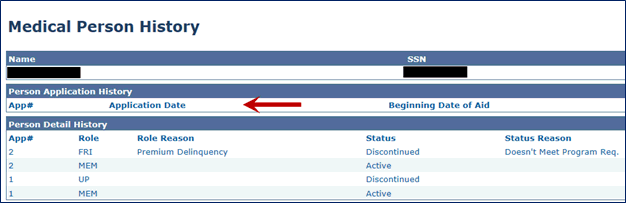
The most common way to spot a missing application event is to navigate to the Medical Person History page which is done by clicking on the person Name hyperlink within the Medical program block on the Case Summary page.
If the Application Date you are working from does not appear at the top of the Person Application History section, you have a missing application event.
NOTE: This is not the only way to identify a missing application event, simply the most common. If you are experiencing any of the issues mentioned above, please follow your office process to report the case and the issue to the KEES Help Desk.
Duplicate IDs should be linked, not updated to say “Duplicate”, “Dup”, or another other creative saying.


A suffix should be added using the Suffix field, not added to the Last Name field.

Call Center Phone Number: 844-723-5337
KEES Tier 1 (Access Issues Only)