KEES Availability this Weekend
Saturday 2/10: 8am-8pm
Sunday 2/11: 12pm-6pm
Important Reminder
BUY IN REMINDER: Due to CMS system updates, the Buy In Deletion Report will be available on February 12th, and the Buy In file will be sent to CMS early on the morning of February 16th. This means the Buy In Deletion Report will need to be completed by close of business on February 15th. Any cases newly authorized between February 12th and 15th that qualify for immediate buy in, will need to have an email sent to the DXC Buy In team to be manually added to the CMS file. LOC-KSXIX-BuyIn@groups.ext.hpe.com
Non-Medical Processing Deadlines
DCF 2018 Processing Deadlines can be found on the DCF Intranet under Policy and Procedures.
Processing Late Reviews for Child Care (Revised from 1/25/2018 Dispatch):
The Reapply process is used for discontinued program blocks when a late Review is turned in the month after the Review due month. Staff need to use the date the late review is received when entering the Application Date and Beginning Date of Aid. The first of the month is used when entering the Begin Date on the Child Care Data Collection pages and the Family Plan. Proration for Child Care occurs in the Child Care Plans. According to policy, consumers should receive a full month of benefits. Use the first of the month as the Begin Date on the Child Care plan(s) unless the consumer does not need a full month of benefits.
Processing Late Reviews for TANF (Revised from 1/25/2018 Dispatch):
The Reapply process is used for discontinued program blocks when a late Review is turned in the month after the Review due month. Previous guidance when registering late reviews for TANF was to us an Application Date and Beginning Date of Aid as the 1st of the Month. This is because KEES does not allow the Beginning Date of Aid to occur prior to the Application Date even though consumers should not receive prorated benefits according to Policy.
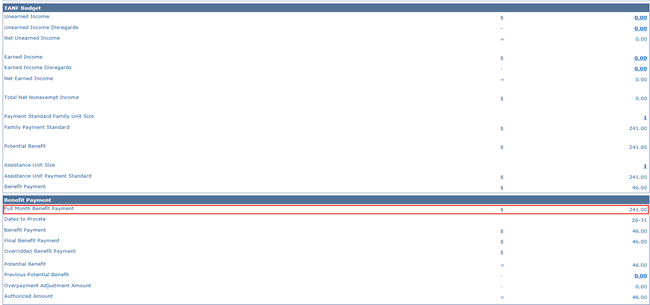
Staff no longer need to enter the Application Date and Beginning Date of Aid as the 1st of the Month if the Review was not received on the 1st of the Month. Instead, staff can override EDBC and use the Benefit Amount listed as the Full Month Benefit Payment on the TANF EDBC Summary page as the amount to issue. Because override EDBC is being used, a NOA will not generate. Staff need to use the attached Standard Copy and Paste text as appropriate. See Overriding an EDBC Budget Allocation in the KEES User Manual for detailed steps on overriding EDBC.
TANF Applicants with a Work Programs Penalty:
When a consumer reapplies for TANF after the Work Program penalty period, but has not cooperated, deny the application using a Negative Action Reason of Not Eligible – Other Reasons. Append the system generated NOA to include the Standard Copy and Paste text below.
When the minimum penalty period has expired:
Your TANF case closed *MM/DD/YYYY* as you failed to cooperate with work programs. Before we can determine your eligibility for assistance, you will need to fully cooperate with work programs for *#*weeks.
Please contact *CAREER NAVIGATOR NAME* for additional information.
Failure to contact your career navigator and complete *#* weeks of work program activity will cause your TANF case to be denied.
NOTE: Consumers must complete two consecutive weeks of work program activity for the first penalty. Or, three weeks of consecutive weeks for a second, third, or fourth penalty.
When the minimum penalty has not expired:
Your TANF case closed *MM/DD/YYYY* as you failed to cooperate with work programs. You were notified at that time regarding the months you were ineligible. You remain ineligible until *MM/DD/YYYY*. You may reapply after that date.
As a reminder, staff need to click the View button on the Eligibility Non-Compliance List page to view all Non-Compliance records. Records with an End Date will not display on the List page unless the View button is clicked.
Call Center Phone Number: 844-723-5337
KEES Tier 1 (Access Issues Only)
KEES Repository KEES Medical User Manual KEES Non-Medical User Manual