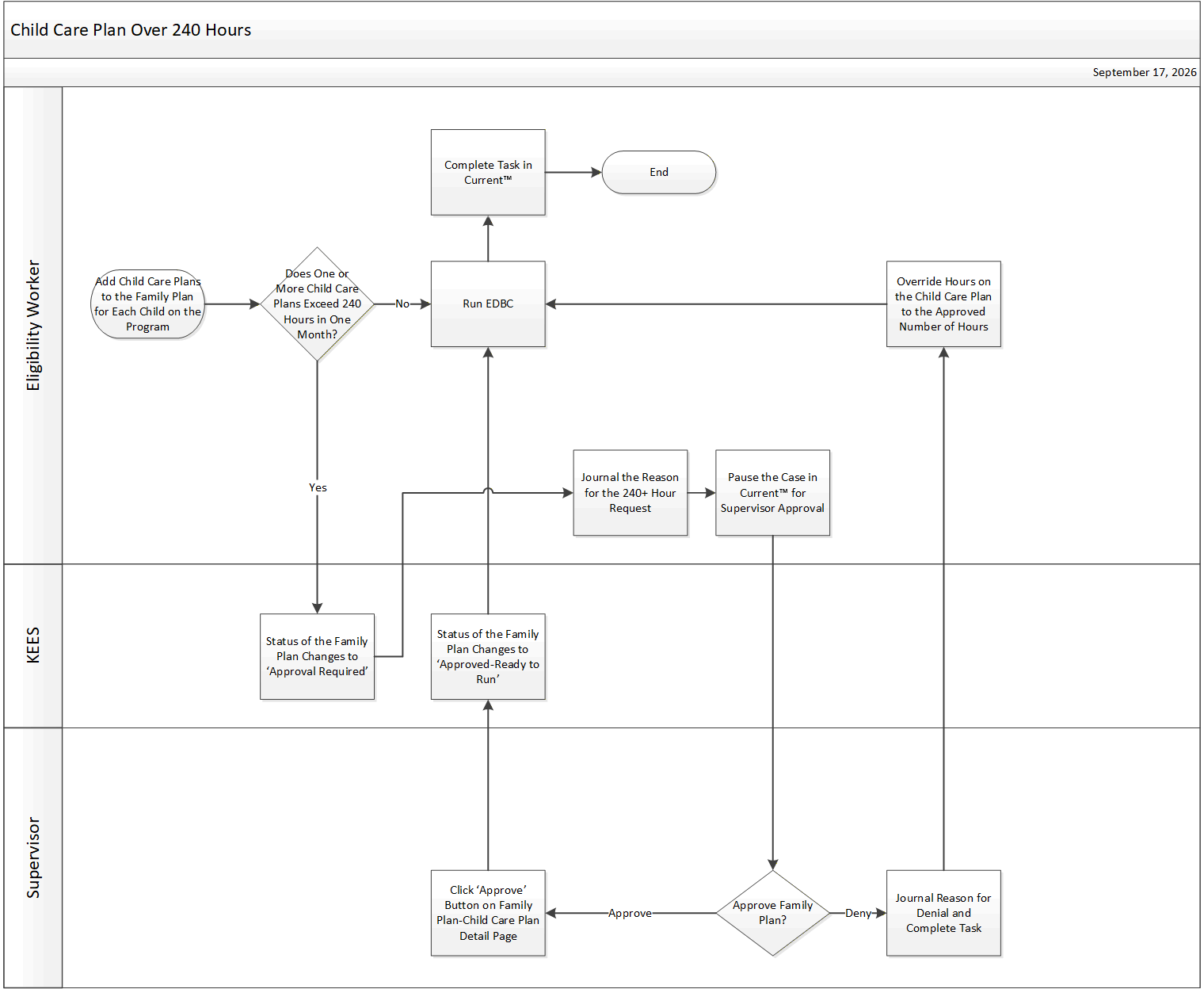
This business process flow shows the high-level steps utilized to process a Child Care Plan with more than 240 hours.
Complete the necessary data collection pages for Child Care including the Family Plan. If a Child Care plan has 240 hours or more in any given month then the Family Plan status changes to Approval Required.
Create a Journal Entry with the reason why the child needs 240 hours or more.
Pause the case in Current™ for Supervisor approval.
Check the Journal to see why the request is being made.
To approve the request, click the Approve button on Family Plan – Child Care Plan Detail page. This updates the Family Plan status to Approved-Ready to Run. To deny the request, create a journal entry with the reason of denial.
Update the Family Plan – Child Care Plan Detail page accordingly.
Determine eligibility by running EDBC.
Complete the task.
Give the case an outcome in Current™.
KEES calculates the number of child care hours according to the Parent and Child Schedules entered into the system. If KEES calculates more than 240 hours, and the request is denied, workers need to override the hours to reflect 240 hours or below.