January schedule for important processing dates:
Reviews Discontinuance Batch for June 2016 Reviews – January 5th
Reviews Discontinuance Batch for July 2016 Reviews – January 13th
CHIP Premium Discontinuance Batch – January 11th
Spenddown Met to Unmet- January 13th
Buy-In Deletion Report available – January 19th
Review Batch Run –January 16th
Buy-In Deletion Report completed – January 19th
COLA Mass Change – January 20th
Timely Notice Closure – January 19th
Negative Change – January 19th
MMIS Monthly – January 23rd
March Come-Up Month Available – January 22nd
Planned Production Outage
Sunday, January 15, 2017 @ 8:00am - Sunday, January 15, 2017 @ 10:00am
During this outage, the KEES Production site will not be available. In addition, the KEES PE Tool and the KEES Medical SSP will also be unavailable.
Planned Production Outage to run COLA Mass Change
Friday, January 20, 2017 @ 5:00pm - Sunday, January 22, 2017 @ 3:00pm
During this outage, the KEES Production site will not be available.
The KEES Repository has moved to a new location! Please save this new link as a favorite for quick access in the future: KEES Repository (don’t forget to delete the old link if you had it saved as a favorite). Because the KEES Repository moved to a new location, you will continue to receive the ‘404-File or directory not found’ error message when clicking hyperlinks within the KEES User Manual. We will be working to update the links over the next few weeks. In the meantime, all of the documents can still be accessed by going directly to the KEES Repository.
If you send in a ticket for the KEES Help Desk to troubleshoot, please do NOT continue to try to fix it yourself. Allow the Help Desk time to either fix the issue or to send a response on how the worker can fix the issue. This is especially important when you are reporting MMIS issues.
Policy Holder Name IS a required text box even though it does not have an asterisk. If that field is left blank, a record will not be sent to the MMIS.
If you notice that a TPL is not showing in the MMIS, and realize that the Policy Holder Name field was left blank on the Third Party Liability-Other Health Insurance Detail page, you will need to remove the original record and add a brand new record with the complete information.
Reminder: The nightly file does not send the end date of the TPL. You will need to continue the off-system process to get that information updated in the MMIS.
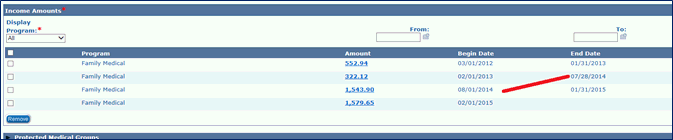
This is just a reminder that a Gap in Income will cause a 1700 Error when running EDBC.
Ex:
As a reminder, we have attached the steps that should be followed if a review is registered as an application in error. These steps are also located in the KEES User Manual.
Home > KEES User Manual Introduction > Medical File Clearance and Registration > Troubleshooting Registration - Medical > Review Registered as an Application in Error
As a reminder, if you just click the PRINT button on your Form/NOA, KEES will not save a copy of it. You should always select either SAVE AND PRINT LOCALLY or SAVE AND PRINT CENTRALLY.
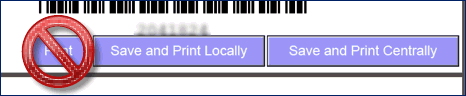
Saves the document to the KEES case and then prints to your office printer. These documents cannot be deleted from the system once the Save and Print Locally button has been clicked.
Saves the document to the KEES case and then sends the document to our print vendor for printing and mailing. These documents can be deleted from the system the same day that they are generated.
Click Save and Print Centrally.
Re-access the document through Distributed Documents.
Click the Print icon at the top of the PDF.
The address for the VA- KDHE Information System form, IM-3121 has been updated. https://khap2.kdhe.state.ks.us/kfmam/elderdisabled_med_forms.asp
Three new Spanish ROI versions are now appearing. http://www.kdheks.gov/hcf/data_requests/default.htm
Call Center Phone Number: 844-723-5337
KEES Tier 1 (Access Issues Only)