August schedule for important processing dates:
CHIP Premium Discontinuance Batch – August 7th
Spenddown Met to Unmet- August 11th
Buy-In Deletion Report available – August 14th
Review Batch Run – August 15th
Timely Notice Closure – August 17th
Negative Change – August 18th
Buy-In Deletion Report completed – August 17th
Final Processing date – must allow time for authorization by KDHE
MMIS Monthly – Aug 18th
Request Verifications Button
For the request verifications button to display, the program must be active or currently pending.
Is the Applicant Pending in All Necessary Months?
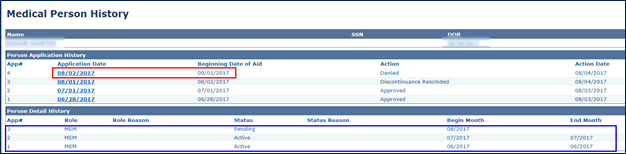
After reapplying for a member, review the Medical Person History page to verify the member is pending in all appropriate months before running EDBC. In the example below, the member applied on 6/28/2017. However, when the application was registered, the member was only put into pending status in the month of 6/2017. This should be sent to the KEES Help Desk. DO NOT continue to register applications in an attempt to get the member into pending status in all months.
The Blue Box- DO NOT continue to register applications. Please send the case to the KEES Help Desk for correction.
DO NOT MAKE YOUR APPLICATION DATE AND BEGINNING DATE OF AID DIFFERENT MONTHS. This has major downstream impacts. There is no medical situation that would require this.
Did you know?
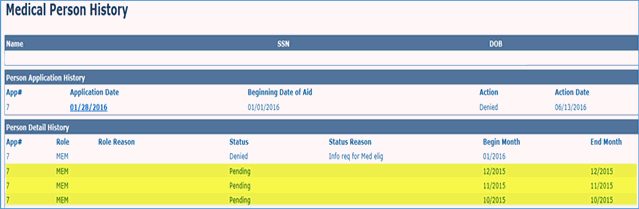
If you leave any months in Pending status after processing a case, the next time the consumer applies for assistance, the Registration Staff will be unable to register the request.
A quick and easy way to tell if you have missed any months is to click on the person name hyperlink in the program block. This will bring you to the Medical Person History page. In the Person Detail History section, check for any months that still say Pending.
Call Center Phone Number: 844-723-5337
KEES Tier 1 (Access Issues Only)
KEES Repository KEES User Manual