KEES Availability this Weekend
Saturday 6/2: 8am - 8pm
Sunday 6/3: 12pm - 6pm
Non-Compliance JAVA Error
The KEES Help Desk is aware of the issue causing a JAVA error on the Non-Compliance page. A data fix is being worked on now and we hope to be able to fix the impacted cases early next week.
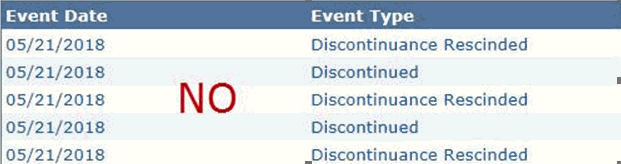
Rescind / Reapply Issues
If a person or program is reapplied or rescinded incorrectly, and benefits are authorized, the KEES Help Desk will be unable to correct the registration error. Please ensure that applications and reviews have been registered correctly before running EDBC for any program.
Example 1: Consumer had Medical benefits through 3/31/18. Review is returned on 5/10/18 but instead of rescinding the 4/2018 discontinuance, a Reapply is done to register the 5/10/18 review. If benefits are then approved for 5/2018, the KEES Help Desk will not be able to undo the 5/10/18 Reapply in order to Rescind the 4/2018 discontinuance.
Example 2: Consumer received Food Assistance through 4/30/18. Review is returned on 5/10/18 but instead of completing a Reapply to register the new 5/10/18 application, the 5/2018 discontinuance is Rescinded. If benefits are then approved for 5/2018, the KEES Help Desk will not be able to undo the Rescind in order to Reapply for 5/10/18.
The KEES Help Desk is still seeing tickets submitted by staff who have attempted to fix a Registration issue themselves. Staff should not take Negative Action on a program if they will then immediately be rescinding that discontinuance. This is not an approved workaround.
Medical Processing Deadlines
Processing Deadlines – Fiscal Year 2019 can be found on the KEES Repository under Other Helpful Information.
Work Programs Auto Logs in Journal
A data fix has been completed to remove the duplicated Journal entries that were being created for Work Programs discontinuance.
Non-Medical Processing Deadlines
DCF 2018 Processing Deadlines can be found on the DCF Intranet under Policy and Procedures.
PPS Vendor Payments
Please remember when setting up a PPS Vendor Payments program block that the PPS Payee must be added as an Administrative Role. The PPS Payee should be the Primary Applicant. SMART Vendors should not be used as the PPS Payee.
When completing the Service Arrangement page, workers must select Same as Provider in the Payee field. This allows the worker to select the SMART Vendor to whom the payment is to be made.
Call Center Phone Number: 844-723-5337
KEES Tier 1 (Access Issues Only)
KEES Repository KEES Medical User Manual KEES Non-Medical User Manual