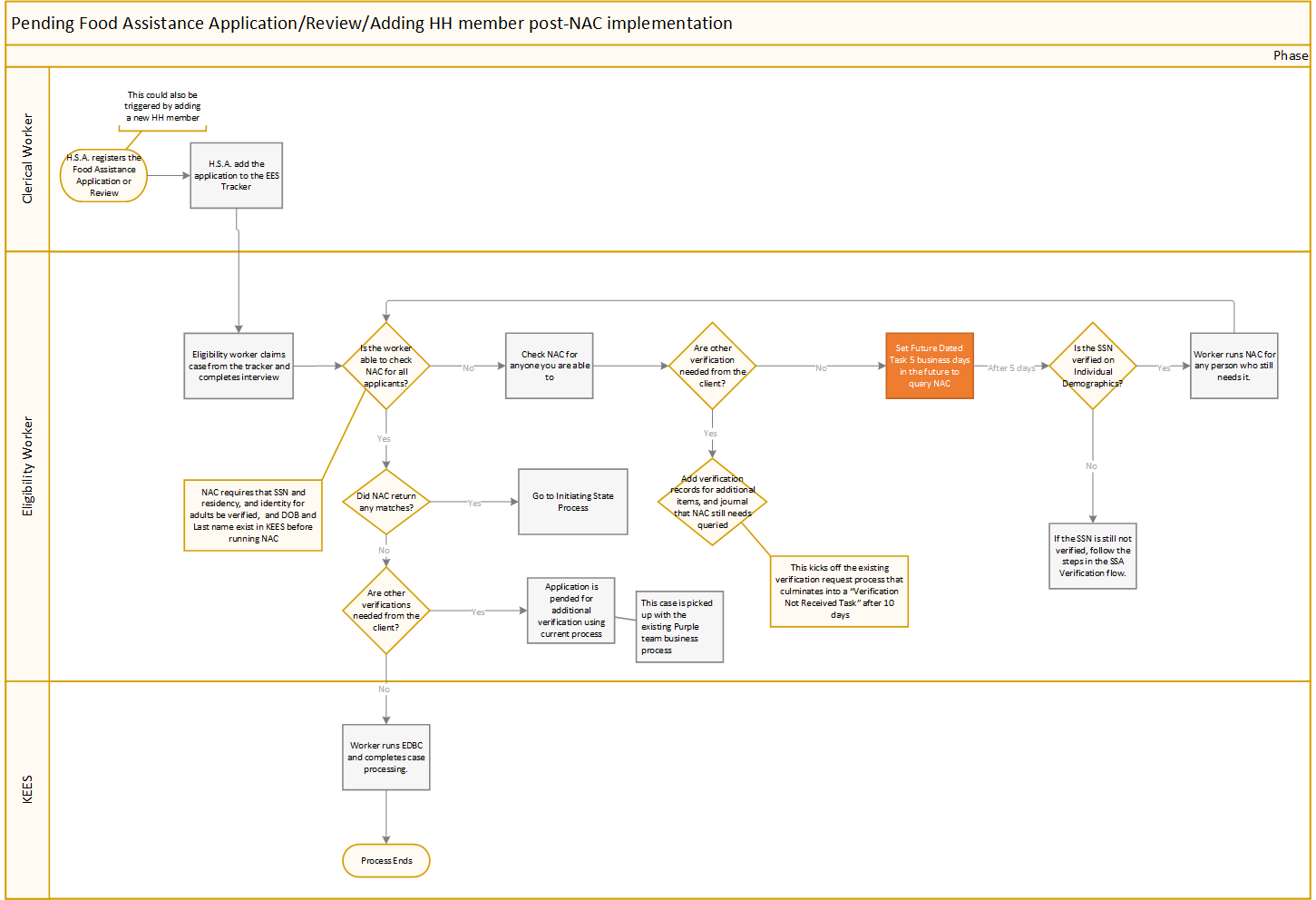
USDA FNS requires that all states participate in an interstate data matching system to prevent duplicate issuance of Food Assistance.
When processing an Application, Review or when adding a new household member, staff must query the National Accuracy Clearinghouse (NAC) to ensure the person is not receiving Food Assistance in another state, prior to issuing benefits. This check is done in KEES via a real-time API with the NAC.
KEES connects with the NAC through a secure interface. Only certain information is sent, and all information is encrypted before sending. KEES sends a nightly file with information for all active MEMs receiving Food Assistance that month. KEES sends:
Last Name
Date of Birth
Social Security Number
Case Number
Client ID
Vulnerable Individual Indicator
Participant Closing Date (if applicable)
Last three months in which Food Assistance was received (not including the current month)
When querying the NAC, KEES only sends Last Name, Date of Birth, and Social Security Number. Please note, in order to query NAC, KEES requires that the Social Security Number must be verified via SSA-SVES or HUB-SSA.
The state who has received the application or review and is conducting the NAC query, is called the Initiating State. During the interview, the Eligibility Worker navigates to the Verification Interface page and selects a “Verification Type” of NAC.
The Eligibility Worker should select all persons who are applying for Food Assistance, who have a verified Social Security Number. The Eligibility Worker selects the appropriate “Search Reason” and clicks Submit NAC Query.
The NAC Interface returns a real time response from the NAC. If a match is found, a hyperlink will display in the Duplicate Participation Response section of the screen. The Eligibility Worker clicks the Match ID hyperlink to navigate to the Duplicate Participation Match Details page. If no match is found, the client’s name will display with “no match found”.
The Eligibility Worker must take initial action on the case immediately. Once initial action is taken, the Eligibility Worker updates the “Initial Action Taken” dropdown with the appropriate value and the “Initial Action Date” with the date the action was taken. If verification is needed from the household to confirm benefits have closed in the matching state, the Eligibility Worker sends a V808 with the Initiating State Standard Copy and Paste text. A verification request should be created using the NAC Initiating State verification type.
Notice Sent: This is selected when the match could not be resolved during the interview and a notice for additional information was sent
Client Provided Required Verification: This is selected when the client is able to provide verification in the interview that benefits have closed in the matching state
Kansas may receive a NAC match as a Matching State in two circumstances:
When a client applies for benefits in another state and that state queries NAC
When a client is receiving benefits in two states at the same time and the NAC completes their Monthly Bulk Matching.
In either situation, an email is sent to the DCF PARIS unit to take Initial Action.
The PARIS unit takes initial action by checking KEES to determine if the household has already reported that they have moved out of state. If the household has not reported any moves, the PARIS unit must notify them of the match using the V808 to send the Matching State Standard Copy and Paste text. The PARIS unit will also attempt to resolve the match by requesting residency or contacting the household. Once the initial action is taken, the PARIS unit updates the “Initial Action Taken” dropdown with the appropriate value and the “Initial Action Date” with the date the action was taken. Initial action must be taken within 10 days of the match.
Notice Sent: A notice is sent to notify the client of the match
Client Verified Moved Out of State: This is selected when the client had already told us they have moved out of state, prior to the match being received.
Kansas must also notify the NAC when final action has been taken on the match in KEES. To access an existing NAC match, the Eligibility Worker navigates to the Special Units Global Navigation Tab, then selects Interfaces on the Local Navigation bar. The Eligibility Worker can search for a specific match on this page.
The Final Disposition Taken must accurately reflect the action actually taken by staff. The Final Disposition Date field is dynamic based on which dropdown option is selected.
Benefits Approved: This option can only be used when Kansas is the initiating state. This should be selected when Kansas has received information to confidently say that the client lives in Kansas and benefits will be approved and issued. Remember: benefits can not be received in two states for the same month.
Benefits Start Date: This date should be the first day of the first month to receive benefits. If the client received benefits in another state, this date should be the first of the month after benefits are terminated in the first state.
Benefits Denied: This option can only be selected when Kansas is the initiating state. This should be selected when Kansas is going to deny the Food Assistance application.
Final Disposition Date: Should be the date EDBC is ran to deny the application
Benefits Terminated: This option can only be selected when Kansas is the matching state. This option is selected when the worker has determined that the client is no longer eligible to receive benefits in Kansas and has taken action to discontinue the Food Assistance program.
Benefits End Date: Should be the last day of the final month that Food Assistance was received in Kansas
Benefits Unchanged: This option can only be selected when Kansas is the matching state. This option is selected when the worker has determined that the participant continues to be eligible to receive benefits and no additional actions were taken
Final Disposition Date: Should be the date the worker determines no additional action will be taken.
The NAC allows us to mark a match as “Invalid” if we consider the match to be a “bad match” that does not represent any potential for duplicate participation. This could be because of incorrect client information, a system error, or potential identity theft. If an Eligibility Worker determines that a match is “Invalid” they should discuss that with their supervisor. If it is suspected that a system error from Kansas was the cause, a KEES Help Desk ticket should be submitted.
When a match is determined to be “Invalid”, the worker should select the appropriate option on the drop down:
Incorrect Client Information
System Error
Potential Identify Theft
Other- Staff should not use this option unless directed to do so. Using this option does populate an “Other Reason” free format text box. It is critical that no PII is entered in this box as it will not be encrypted when going to the NAC.
Information entered on the Duplicate Participation Match Details page in KEES is submitted to NAC in real time when the worker clicks the “Submit to NAC” button. Match data is not stored in KEES and the most up to date information is populated every time the match is accessed.
A match is considered Closed when both states have taken a “Final Disposition” or marked the match “Invalid”. Once a match is closed, the information provided in the “Final Disposition” section is considered verified information for the matching state.
If needing to determine if NAC was queried, navigate to the Verification Interface page and select a “Verification Type” of NAC. You can select the “View History” button at the bottom of the screen to see all previous queries for that case number.