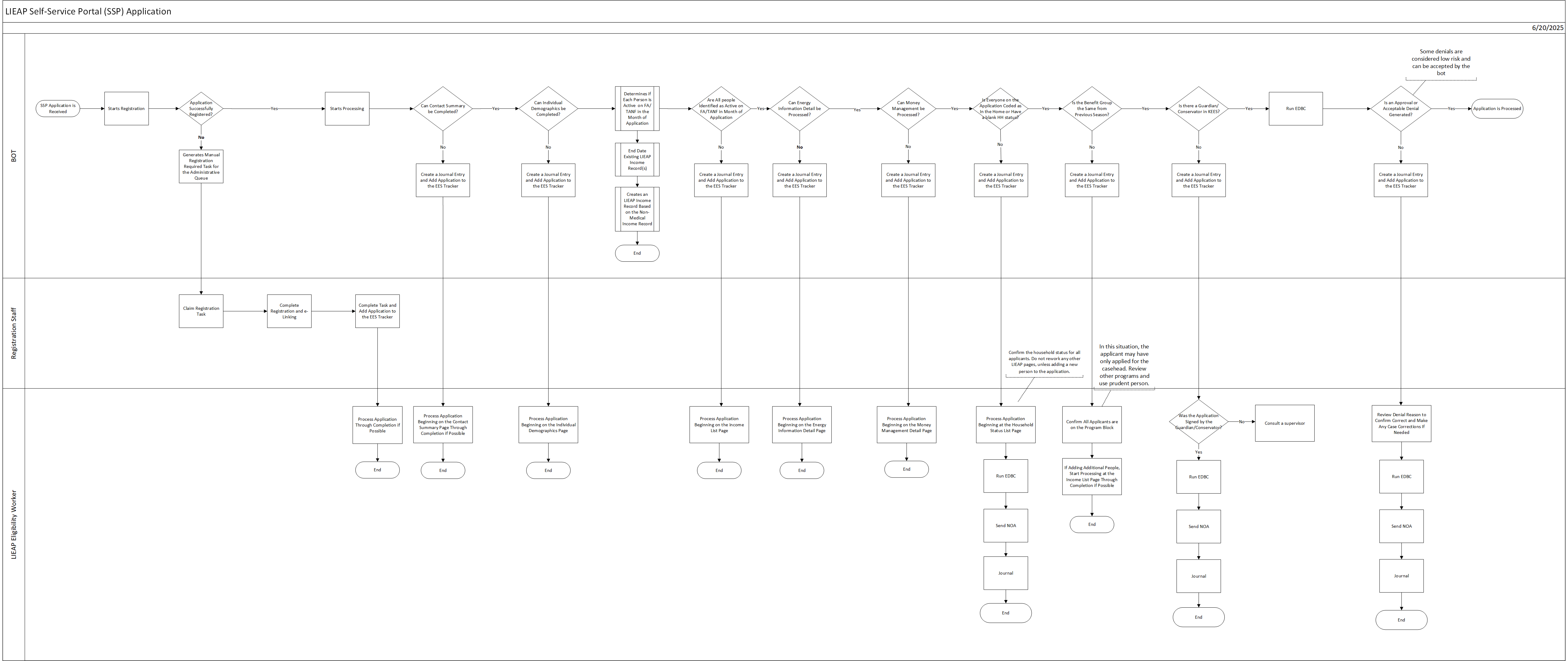
This business process flow shows the high-level steps utilized to process a LIEAP Application received from the SSP in KEES.
All LIEAP applications submitted from the Self-Service Portal (SSP) are prioritized in a list to be registered and processed by a No Touch BOT in KEES. The No Touch BOT determines if there is an existing LIEAP case number the e-application can be linked to, or if a new LIEAP case number must be registered. If it is unable to determine if a new case or existing case should be used, the BOT creates a task for registration staff to manually register the application. If the BOT can successfully register the application, then the BOT attempts to process the LIEAP application. When the BOT reaches a point in which it is no longer able to continue processing, the BOT creates a journal entry detailing which step in the process the worker should start with and adds the application to the EES Tracker.
No Touch BOT (KEES):
Creates a LIEAP No Touch Registration Manual task for the LIEAP queue
Registration Staff:
Claim the LIEAP No Touch Registration Manual task
Link and register the e-Application if the e-Application is not linked or a program block does not exist.
Validate the address and Worker ID on the LIEAP program block are correct
Create a task on the EES Tracker for the e-Application
Finish the task in KEES with a status of DCF-Complete
Eligibility Worker:
Claim the e-Application from the EES Tracker
Process the e-Application task using first contact resolution. See the BPM Handbook for more information.
Print all electronic documentation to Perceptive Content utilizing ImageNow Printer in the Case No-Task basket
Update the EES Tracker with the status of the case
No Touch Bot (KEES):
The No Touch BOT attempts to process the LIEAP application by acting on each LIEAP data collection page. If the BOT reaches a point in which it cannot continue, it creates a Journal entry instructing the worker where to start processing and adds the case to the EES Tracker.
The No Touch BOT processes the LIEAP application in the following order:
Contact Summary Page
Accepts any address changes except for Foster Children.
If the Physical address is out of state, the BOT stops processing.
Individual demographics
The BOT ignores changes to first name, SSN or Date of Birth.
Accepts changes to race/ethnicity, email address and phone number.
If there is a change to the last name that is not identified as a likely typo, the BOT stops processing.
Income
The BOT compares the income reported on the application to income known to any Active Food Assistance, TANF or Child Care programs.
If the application has a change in income the BOT stops processing. A change in income is defined as there being more than a 20% difference between known income and the application.
If there is no change in income, the BOT creates a LIEAP income record of the same type and amount as on the Active Food Assistance, TANF or Child Care program.
If there is no income reported on the application and no income on the Active Food Assistance, TANF, or Child Care program it is considered verification of no income.
If there is no Active Food Assistance, TANF, or Child Care program the BOT stops processing.
Energy Information Detail
If the applicant reports a change in dwelling type, fuel source, or how the bill should be split, the BOT stops processing.
Money Management
The BOT compares the vendor listed on the application to the existing vendor from a previous LIEAP season. The BOT has been taught to compare common names (i.e. if the application says KSGAS, it recognizes that vendor as One Gas).
If the application reports a new vendor, or if the vendor or service is no longer Active, the BOT stops processing.
Compare Household Status
The BOT checks to see if all people being applied for have a Household Status of “In the Home” or blank. If not, the BOT stops processing.
Compare Benefit Group
The BOT compares the Benefit Group size to the last time a LIEAP application was processed. If there is a difference, the BOT stops processing.
Check for Guardian/Conservator
The BOT checks for an existing Guardian or Conservator. If one exists, the BOT stops processing.
Run EDBC
The BOT Saves and Accepts any EDBC results that end in approval.
The BOT reviews any denials and only Saves and Accepts denials that have been identified as low risk. If the denial cannot be saved, the BOT stops processing.
Eligibility Worker:
Claim the e-Application from the EES Tracker.
Go into the context of the case and review the Journal for instructions on where to start processing.
Process the e-Application beginning on the first page that was not completed by the BOT using first contact resolution. See the BPM Handbook for more information.
Print all electronic documentation to Perceptive Content utilizing ImageNow Printer in the Case No-Task basket.
Update the EES Tracker with the status of the case.
e-Applications are queued to be registered by the No Touch BOT by order of priority: 18-hour, 48-hour, no priority. Within each priority they are added in the order of which they were submitted from the SSP.
The No Touch BOT processes all applications submitted prior to 5pm each day and will continue working until it has processed all applications in the business day or until KEES availability ends for the day. For example, if KEES availability is 6am to 8pm then the BOT will run if there are applications to be registered. If it is caught up to same day registration, then it will stop prior to 8pm in this scenario once it has completed all applications received prior to 5pm that day.
When claiming a LIEAP application that has been partially processed by the No Touch BOT, the eligibility worker should not rework any page that has already been completed by the No Touch BOT.