A Non-Compliance Type of Generic is used to discontinue or deny consumers who refuse to take a requested drug test or test positive.
Users should navigate to the Non-Compliance page and click the View button to determine if the consumer has any Non-Compliances for suspicion based drug testing.
Because the Non-Compliance Type of Generic is being used, Standard Copy and Paste Text must be used.
If a consumer is in non-compliance according to the Suspicion Based Drug Testing (SBDT) policy, the user must create the Non-Compliance record on the Non-Compliance List page before running EDBC. The Non-Compliance record should only be added for the person(s) in non-cooperation with SBDT Policy. Please see Non-Financial Data Collection Non-Compliance for more information on completing this page. The TANF and FA disqualification for failure or refusal to complete TANF drug testing should always be recorded separately.
For TANF Consumers: Use the Generic non-compliance Type. Select TANF as the Program. Enter the Begin Date as the first day of the first month the disqualification is applied, taking Timely and Adequate Notice into consideration. An End Date does not populate and nothing should be entered in the Override End Date until the consumer cooperates. In the Comments text box for the record enter which disqualification it is for the consumer:
First Failure, Second Failure, Third Failure, First Refusal, Second Refusal, Third Refusal
Once the consumer ‘cures’ the disqualification , the record must be edited to enter the Override End Date of the day prior to the month benefits should begin. For example: TANF benefits to start 02/01/20XX. End Date for Non-Compliance should be 01/31/20XX. See Editing or End Dating a Non-Compliance Record.
For FA Consumers: If the TANF recipient is also Active on a Food Assistance program, use the Failure to Provide - SSN non-compliance Type. Select Food Assistance as the Program. Enter the Begin Date as the first day of the first month the disqualification is applied, taking Timely and Adequate Notice into consideration. An End Date does not populate. Enter the Override End Date as the last day of the disqualification month based policy. In the Comments text box for the record enter which disqualification it is for the consumer:
First Failure,Second Failure, Third Failure, First Refusal, Second Refusal, Third Refusal
Delete the Change NOA and send the V808 with wording regarding the comparable drug testing disqualification . See TANF Drug Testing – Comparable disqualification for the standard text.
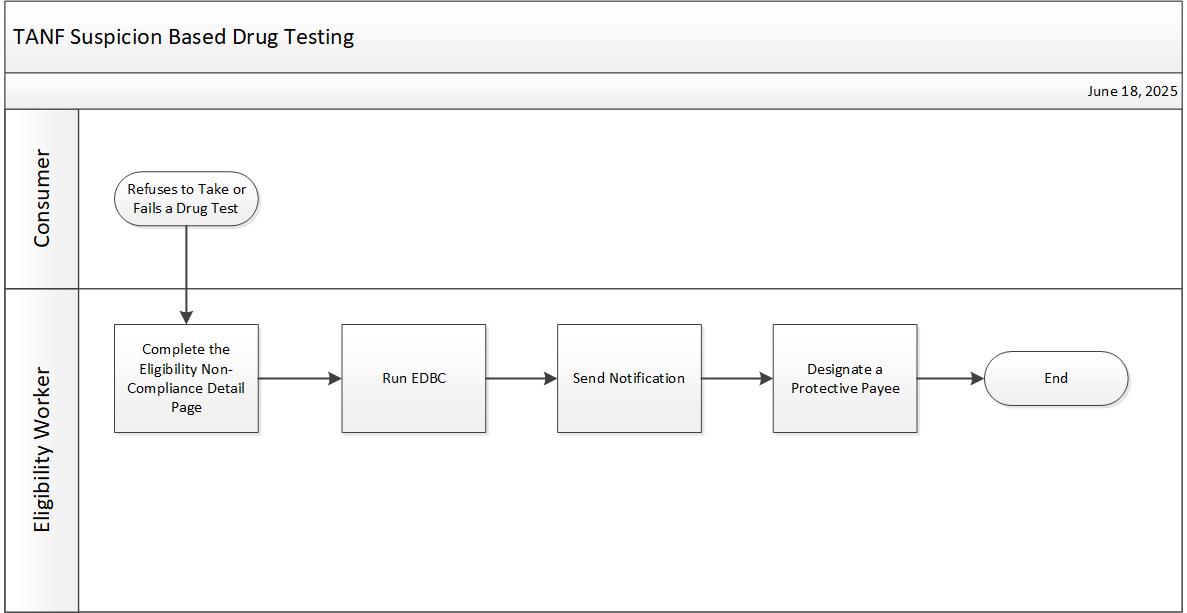
This business process flow shows the high-level steps utilized to apply a disqualification for TANF Suspicion Based Drug Testing (SBDT).
When a consumer refuses to take or fails a drug test, a Non-Compliance record must be created in KEES.
NOTE: For a first positive test refer to SRCC for treatment and/or skills training prior to applying a Non-Compliance record. If the individual fails treatment and/or skills training, follow the guidance below.
Complete the Eligibility Non-Compliance Detail page using the following criteria:
Name: Applicant or Recipient who refused or failed the drug test
Program: TANF
Type: Generic
Reason: Generic
Begin Date: First day and month of applicable disqualification month
End Date: Leave blank
Comments: Indicate a first failure/refusal, second failure/refusal, or third failure/refusal.
If the consumer is receiving TANF and Food Assistance at the time of the disqualification, complete the Eligibility Non-Compliance Detail page again to indicate a comparable disqualification for Food Assistance. A non-compliance type for a comparable disqualification does not exist for Food Assistance in KEES. Do not use a type of “Generic” as it gives the consumer a role of FRE, but it incorrectly counts the consumer’s income in full. Per KEESM 4212.2, the consumer should be excluded from Food Assistance and a pro rata share of income should be used. To exclude the consumer from Food Assistance appropriately, create a Non-Compliance record using the following criteria:
Name: Applicant or Recipient who refused or failed the drug test
Program: Food Assistance
Type: Failure to Provide
Reason: SSN
Begin Date: First day and month of applicable disqualification month
End Date: Set according to policy guidelines. See KEESM 2552.2 for more information.
Comments: Indicate a first failure/refusal, second failure/refusal, or third failure/refusal.
Delete the system generated NOA and send the V808 with standard copy and past text for FA Comparable Penalty-Failure to Comply with TANF Drug Testing.
Designate a Protective Payee for TANF. See KEESM 2260.9 for policy guidance.
When a disqualification ends, end date the Non-Compliance record and re-run EDBC. See KEESM 2260.13 for more information about regaining eligibility.
All communication between Eligibility Workers and Regional Drug Coordinators (RDC) is done through email.
See the DCF Imaged Forms Desk Aid for guidance on imaging information related to TANF Suspicion Drug Testing.
A future dated tasks is not needed as a reminder to add a consumer back to Food Assistance when the comparable penalty period ends. If a consumer is still active on Food Assistance when their disqualification period ends, KEES generates a Penalty Period Ending task via the Penalty Period Ending batch for the Orange-Purple queue, and maps the task to Current™. Staff will re-run EDBC to update the consumer’s role from FRE to MEM. The monthly batch identifies active persons (regardless of their role) on an active Food Assistance program with a Non-Compliance record (excluding Child Support Services Penalties) that is ending in the month it runs.
Other information regarding SBDT processes and training can be found on Training by Topic under the TANF Program header.