KEES Availability this Weekend
Saturday 2/10: 8am-8pm
Sunday 2/11: 12pm-6pm
Important Reminders
Incident Ticket Status Requests
To inquire upon the status of a pending incident ticket, please do so by sending an e-mail to the KEES Help Desk. Be mindful to reference the incident ticket number within the subject line.
Required Date Fields
Always use the date format of mm/dd/yyyy when entering data in the date fields within KEES. KEES has been known to generate an error when the ( / ) slash mark is not utilized in some fields.
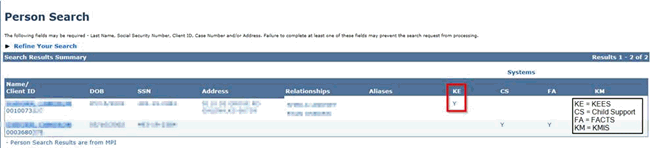
Person Search Reminder
When searching to determine if the consumer is known to KEES, look for the Y in the KE Systems column. Help Desk is receiving reports that users have confused FA as being known to Food Assistance. FA when referencing Systems stands for FACTS.
Important Reminder
BUY IN REMINDER: Due to CMS system updates, the Buy In Deletion Report will be available on February 12th, and the Buy In file will be sent to CMS early on the morning of February 16th. This means the Buy In Deletion Report will need to be completed by close of business on February 15th. Any cases newly authorized between February 12th and 15th that qualify for immediate buy in, will need to have an email sent to the DXC Buy In team to be manually added to the CMS file. LOC-KSXIX-BuyIn@groups.ext.hpe.com
Non-Medical Processing Deadlines
DCF 2018 Processing Deadlines can be found on the DCF Intranet under Policy and Procedures.
ABAWD EDBC Indicator (Revised from 1/31/2018 Dispatch)
The Program Configuration block on the Food Assistance EDBC Summary page does not indicate Adult(s) as an ABAWD when a child is Temporarily Out of the Home due to Foster Care. If Food Assistance is active and TANF is not, staff need to update the Child’s Household Status Detail record to Permanently Out of the Home in order for the EDBC Summary to indicate the Adult(s) as ABAWD. Since TANF remains Active for 180 days, the individual must cooperate with TANF work programs and the adult is not considered an ABAWD until TANF is discontinued.
Approved Child Status Change Task
The Approved Child Status Change task is generated for the Purple queue when a Relative Provider is approved, denied, or discontinued to provide care for a child. Currently, the task is generation without a region, location, case number or case name. Until this issue is fixed, Child Provider Enrollment staff will e-mail this information to the Purple team.
V004: Landlord/Residency Verification Request Form
The Landlord Letter is pulling in the Mailing Address Instead of the Home Address when the Mailing Address is a PO Box. Access the form from KEESM and send it off system if the Mailing Address is a PO Box.
DCF Data Acceptance Webinar Q & A
Call Center Phone Number: 844-723-5337
KEES Tier 1 (Access Issues Only)
KEES Repository KEES Medical User Manual KEES Non-Medical User Manual