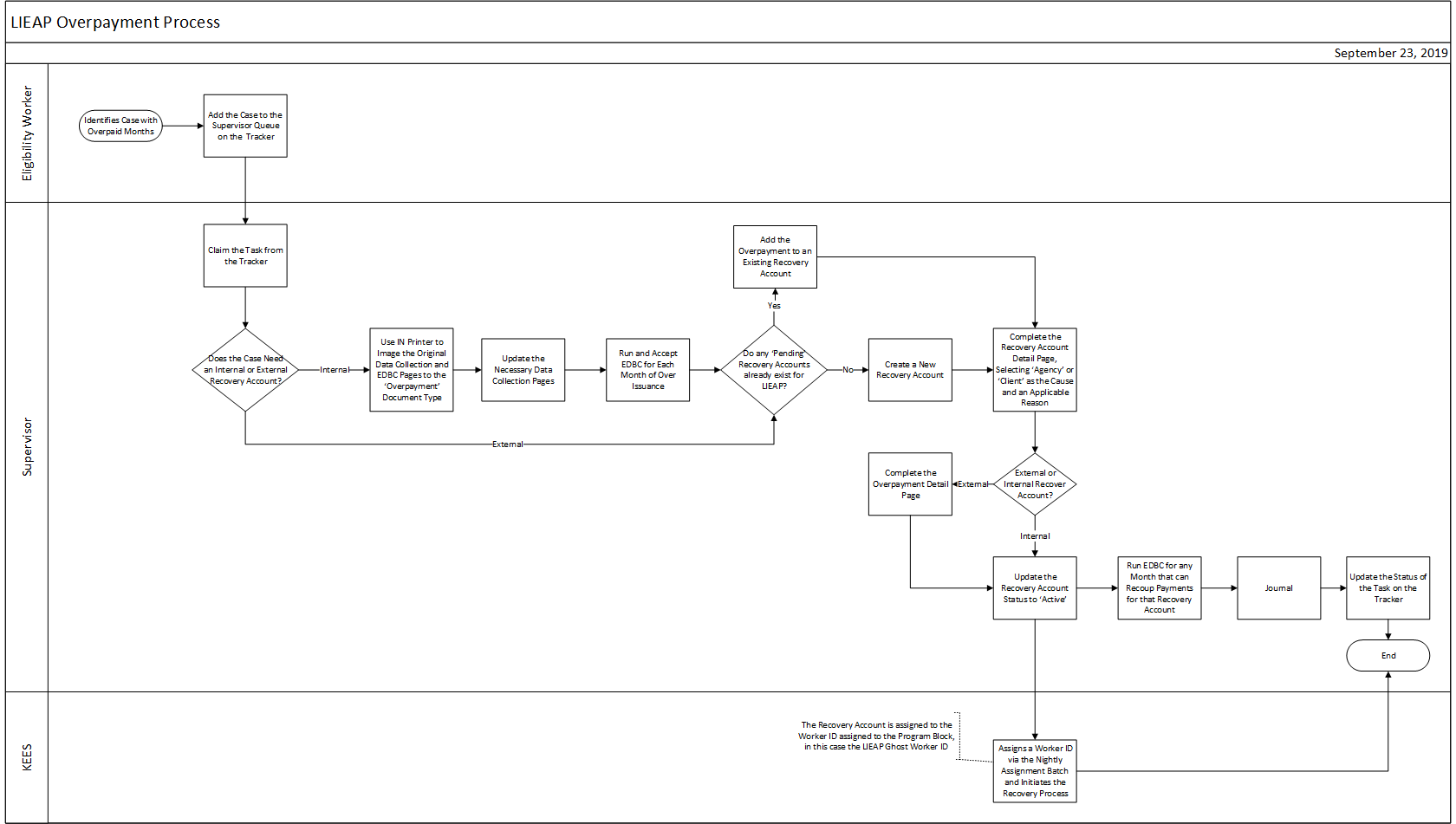
This business process flow shows the high-level steps utilized to process LIEAP overpayments.
Business Process Diagram
Business Process Steps
LIEAP overpayment recovery accounts are set up in KEES by the LIEAP site managers. These cases are added to the tracker under the Supervisor queue with a standard comment of Overpayment if identified by an eligibility worker.
The business process steps for this process are broken down into separate sections:
NOTE: External Recovery Accounts are used when an overpayment is not the result of running EDBC rules. Overpayments for LIEAP months occurring prior to KEES require an External Recovery Account. In addition, if the wrong vendor is paid, an External Recovery Account with a LIEAP Wrong Vendor reason is set up.
Setting Up an Overpayment with an Internal Recovery Account
LIEAP Site Manager:
Use IN Printer to image the original data collection and EDBC pages to the Overpayment document type.
Update the necessary data collection pages. See LIEAP Data Collection for additional information on completing these pages.
Run EDBC for the month(s) of over issuance.
NOTE: Remember to always run the EDBC months in order from the initial overpayment month to the last overpayment month if processing overpayments for multiple LIEAP seasons.
Determine if any Pending recovery accounts already exist for LIEAP. Each program with an over issuance requires a recovery account for its overpayments.
Add the overpayment to the existing recovery account if there is already a Pending recovery account for LIEAP. See Adding an Overpayment to an Existing Recovery Account for detailed steps.
Create a new recovery account if there is not already a Pending recovery account for LIEAP.
Complete the Recovery Account Detail page.
Enter the Discovery Date
Assign the Office Ghost Worker ID to the Recovery Account
Select Agency, Client, or Fraud-LIEAP as the Cause and an applicable Reason.
Add the Responsible Party
NOTE: All adults on the program at the time of the overpayment are added as a responsible party. When there are multiple responsible parties, KEES will not allow staff to add them at initial creation of the recovery account. As a result, finish setting up the recovery account and add the additional people before setting the recovery account to Active.
Update the status to Active on the Recovery Account Detail page to initiate the recovery process and add any additional adults as a responsible party.
Run EDBC for any LIEAP month that can recoup payments for that recovery account.
Generate the L-5: LIEAP Notice of Overpayment form from the Recovery Account Detail page.
Setting Up an Overpayment with an External Recovery Account
External Recovery Accounts are used when an overpayment is not the result of running EDBC rules. Overpayments for LIEAP months occurring prior to KEES require an External Recovery Account. In addition, if the wrong vendor is paid, an External Recovery Account with a LIEAP Wrong Vendor reason is set up.
Determine if any Pending external recovery accounts already exist for LIEAP. Each program with an over issuance requires a recovery account for its overpayments. Add the overpayment to the existing external recovery account if there is already a Pending external recovery account for LIEAP.
Create a new external recovery account if there is not already a ‘Pending’ external recovery account for LIEAP.
Complete the Recovery Account Detail page.
Select LIEAP as the Program Type
Enter the Discovery Date
NOTE: When LIEAP overpayments are set up from a previous year, the date the overpayment was identified (not the current date) should be used as the Discovery Date. If the current date is used as the Discovery Date, the overpayment will not be recouped in the next year of benefit issuance.
NOTE: All adults on the program at the time of the overpayment are added as a responsible party. When there are multiple responsible parties, KEES will not allow staff to add them at initial creation of the recovery account. As a result, finish setting up the recovery account and add the additional people before setting the recovery account to Active.
Complete the Comment section with vendor information on the Recovery Account Detail page if the recovery account is set up to track money coming back from an incorrect vendor. This is especially important if there is more than 1 vendor paid and more than 1 recovery account set up. LIEAP benefits issued to the wrong vendor will not be reissued to the correct vendor until the wrong vendor returns the funds back to DCF.
Complete the Overpayment Detail page.
Enter the month of the overpayment in the Benefit/Service Month field.
Select LIEAP from the Aid Code drop-down menu.
Enter the Original Payment amount.
Enter the Correct Payment amount.
Select No from the Non-Reportable drop-down menu.
Update the status to Active on the Recovery Account Detail page to initiate the recover process and add any additional adults as a responsible party.
Run EDBC for any LIEAP month that can recoup payments for that recovery account.
Generate the L-5: LIEAP Notice of Overpayment form from the Recovery Account Detail page.
Key Process Considerations
The Nightly Assignment Batch assigns the recovery account to the Worker ID assigned to the program block when the recovery account becomes Active; in this case, the LIEAP Ghost Worker ID.
Overpayments can be added to existing accounts if the account is still in ‘pending’ status. All applicable, known overpayments should be assigned to the same existing recovery account before activating the account.
Lump sum payments made by consumers are routed to the DCF Department of Administration. Payments are posted on the Transaction Detail page in KEES. See Posting a Repayment Transaction for detailed steps. LIEAP Site Managers do not have security access to post a payment in KEES.
KEES Logic for Recouping from a LIEAP Benefit:
If the recovery account is in pending status, the recoupment will not be withheld from the regular and/or supplemental benefit.
If the recovery account is in active status, the reason is LIEAP Wrong Vendor and the discovery date on the recovery account is dated in the current calendar year, the benefit will not be recouped.
If the recovery account is in active status, the reason is LIEAP Wrong Vendor and the discovery date on the recovery account is dated in a past calendar year or earlier, the benefit will be recouped.
If the recovery account is in active status and the reason is Active, the recoupment will be withheld from the regular and/or supplemental benefit, regardless of discovery date.
If the recovery account is in suspended status, the recoupment will not be withheld from the regular and/or supplemental benefit.