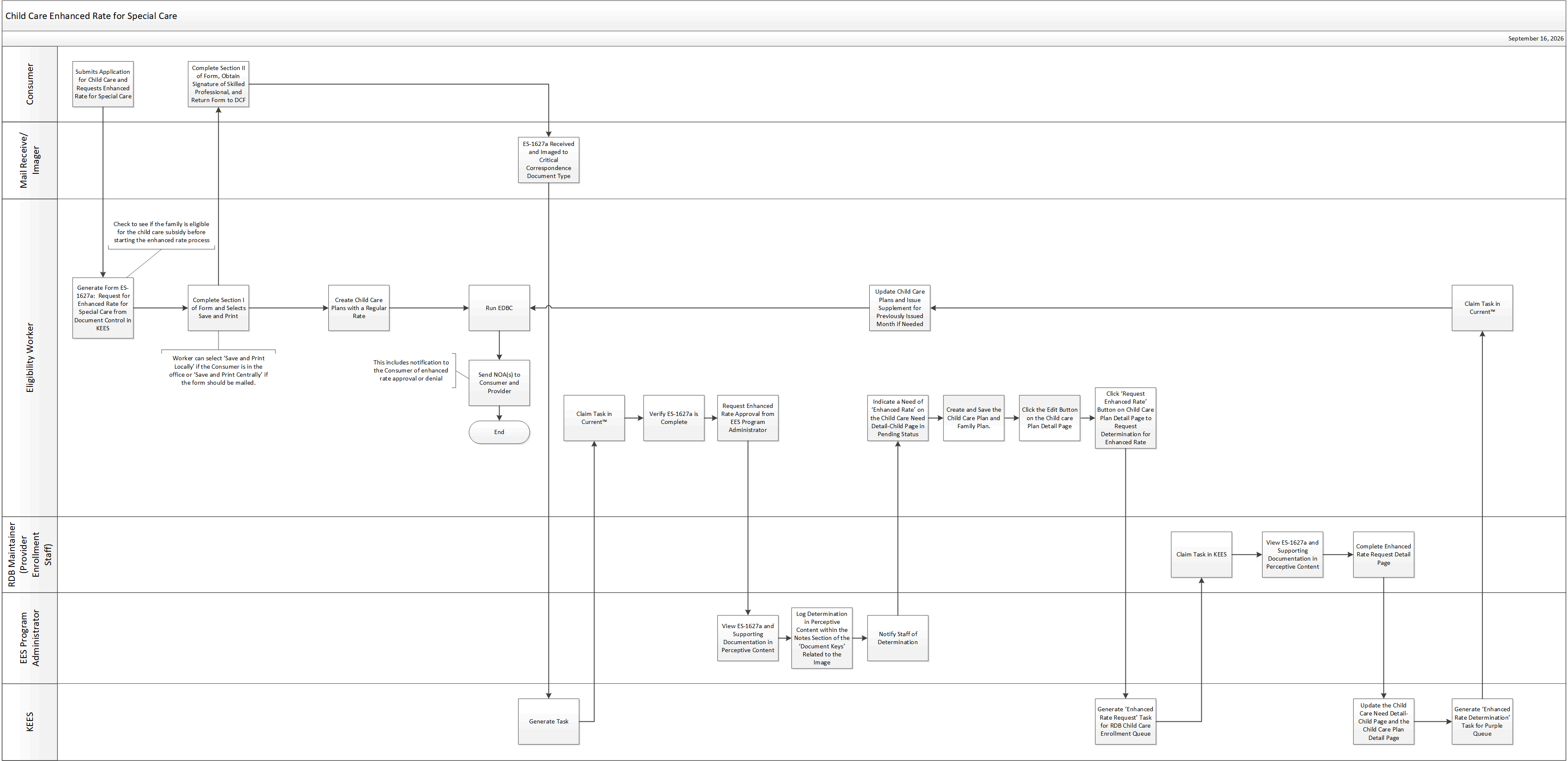
This business process flow shows the high-level steps utilized to process a request for a Child Care Enhanced Rate for Special Care
NOTE: If processing a Review with an existing Enhanced Rate, see Request for Enhanced Rate at Child Care Review for detailed steps. It is not necessary to send the 1627a: Request for Enhanced Rate for Special Care form to the consumer prior to processing. If an updated form is required, it will be sent to the consumer by Child Care Provider Enrollment Staff.
Consumer submits an application with a request for a child to be considered for Enhanced Rate for Special Care.
Determine if the family is eligible for Child Care Subsidy before requesting enhanced rate.
Generate the 1627a: Request for Enhanced Rate for Special Care form from Document Control in KEES. Complete Section I then Save and Print.
NOTE: “Save and Print Locally” if the consumer is in the office or “Save and Print Centrally” if the form should be mailed.
Issue Child Care benefits with the regular rate while waiting on an Enhanced Rate determination.
Complete Section II of the form, obtain signature from skilled professional and return to DCF.
Image the 1627a: Request for Enhanced Rate for Special Care form and index to the ‘Critical Correspondence’ document type to generate a task.
Claim the task in Current™.
Verify 1627a form is complete.
Contact the EES Program Administrator for preliminary approval of the request.
Pause the case in Current™ if needed.
EES Program Administrator:
Review the documentation, document the determination in Perceptive Content in the ‘Notes’ section of the ‘Document Keys’ and notify the Child Care Provider Enrollment Staff.
Eligibility Staff:
Create a need of ‘Enhanced Rate’ on the Child Care Need Detail – Child page. See Adding a Child Care Need for a Child(ren) in order to Request an Enhanced Rate of Care for detailed steps.
Click the Edit button on the Family Plan – Child Care List page and the Child Care Plan page.
Click the ‘Request Enhanced Rate’ button on the Child Care Plan Detail page in KEES. This generates a task for the RDB Child Care Provider Enrollment queue. See Requesting an Enhanced Rate for detailed steps.
Give the task an outcome in Current™.
Claim the ‘Enhanced Rate Request’ task in KEES.
View the 1627a and supporting documentation in Perceptive Content.
Complete the ‘Enhanced Rate Request Detail’ page. Completion of this page will update the ‘Child Care Need Detail – Child’ page and generate a task for eligibility staff. See Processing Enhanced Rate Request for detailed steps.
Complete the task in KEES.
Claim the ‘Enhanced Rate Determination’ task in Current™.
Update Child Care Plans and Family Plan accordingly and issue a supplement for already issued months, if needed.
Create or Update Child Care Plans and Family Plan accordingly.
Run EDBC.
Send notification to Consumer and Provider if needed.
Append the generated NOA to notify a consumer of an enhanced rate approval or denial in the comments section.
Give the task an outcome in Current™.
Enhanced Rate for Special Care requests are made and determined in KEES.
EES Program Administrators document approval or denial of an enhanced rate in Perceptive Content.
Child Care Provider Enrollment staff document approval or denial of an enhanced rate on the Enhanced Rate Request Detail page in KEES.
Adding a special need for a child does not guarantee an enhanced rate. Providers have to be approved for the enhanced rate for the designated child.
If/When the enhanced rate is approved; an underpayment can be made if the enhanced rate should have applied to previous months. The number of months that should be included for underpayments will need to be determined by the eligibility worker based on the date of the enhanced rate approval. See To Process an Underpayment for detailed steps.
Staff will need to override the Family Plan when there is a change to a child care plan linked to an Enhanced Rate that requires staff to end date the child care plan. This involves looking at the hours calculated by KEES and multiplying that by the Enhanced Rate to get the cost of care. End dating the child care plan breaks the tie between the case and the Enhanced Rate provider in the RDB. Since the tie is broken, KEES calculates the cost of care at the normal rate unless this step is taken. There is no need to request an Enhanced Rate approval again if the Child Care program is still within the 1 year review period.
When a change is made that extends the Guaranteed Eligibility Period, the End Date on the Child Care Need Child page should be updated to match the last day of the newly established Guaranteed Eligibility period.
When the enhanced rate is approved for a temporary period (less than 90 days), set up a follow-up needed task. See the Future Dated Task desk aid for detailed steps.